Veta 5.2 Released

Veta Software Update

We are pleased to announce the release of Veta 5.2. This version focuses on alignments and additional file support. We added limited support for LandXML files, including the ability to read station information. Support was also added for Leica compaction files and MOBA EVIB compaction files. Zip and Gzip files can also be imported, eliminating the need to extract the data first. Finally, we added support for the AASHTO draft specification for intelligent construction data files. We currently support compaction, thermal profiling, and laser test roller files. Additional information can be found on the new Developers page. All changes are listed below.

Download Veta 5.2

Installation

  • Microsoft .NET 4.6.2 is required.
  • Windows 7 SP 1 is the minimum supported operating system.
  • Veta 5.2 can be installed on the same machine as previous versions.
  • Veta 5.2 can open projects created in previous versions, but not vice-versa.

Import

  • New: Added support for TDS files (standard file format) for compaction, thermal profiling, and laser test roller.
  • New: Added support for Leica compaction files.
  • New: Included support for EVIB when using MOBA compactors.
  • New: Zip and Gzip data files that contain only one file are now supported.
  • Change: Specifying the machine vendor is no longer necessary, so the dropdown was removed from the import wizard.

Data Files

  • Fixed: Viewing files could cause data to be incorrect or missing.

Alignments

  • New: Added support for KML.
  • New: Added limited support for LandXML alignments and stations.
  • Change: Alignments were originally used only for drawing on the map but have now become an integral part of the software. To account for this, the nomenclature has changed:
    • Alignment is now Alignment File (each file can contain multiple alignments)
    • Drawing is now Alignment (stations and station equations/regions are defined here)
    • Object is now Line

Filters

  • New: The offset location filter can now use stations.
  • Change: The Position input for offset location filters has been removed. Positive numbers are the right of the reference line, negative to the left.

Analysis

  • Fixed: Thermal profile did not always redraw.

Misc

  • New: Added a Zoom to Station option.
  • Change: The options “Use SI units” and “Location unit” have been moved to the Project Properties. New projects will use the most recently used values for these items as default.
  • Change: Generated final coverage for all passes that only contain static data will no longer show ICMV.
  • Change: Improved map performance.
  • Fixed: Some previous projects (3+ years ago) could not be opened successfully.
Read more

Veta 5.1.21 Released

Veta Software Update

This important update fixes several issues.

Download Veta 5.1

Import

  • Fixed: Corrected checking for invalid coordintes for MOBA IC data. Existing projects will be automatically reprocessed.

Data Files

  • Fixed: Viewing compaction files can cause data to be incorrect or missing.
  • Change: The search tool and viewing of pass counts have been removed from this screen. Search tool may return but it is currently not possible to reliably show the pass counts on a per-file basis in this screen. If you need to see this data, use the Filters.

Sublots

  • Fixed: If the coordinate system was UTM but the Location unit in Options was not meters, the sublots length description was labeled as meters, but the sublots were actually defined using the Location unit (feet or survey feet). The actual distance and unit used by Veta were correctly displayed in the Analysis. UTM is by definition, meters.

Misc

  • Fixed: Filter groups could sometimes link to filters that no longer exist, causing a crash when applying the filter group. While this does not fix the cause, it will clean groups of bad links.
Read more

Veta 5.1.16 Released

Veta Software Update

This update addresses problems that will prevent downloading data directly from MOBA.

Download Veta 5.1

Import

  • Fixed: Downloading MOBA data could fail if a file had no data.
  • Change: Server addresses for downloading MOBA have been updated. It is not known how long previous 5.x versions will be able to download MOBA data.
Read more

Veta 5.1 Released

Veta Software Update

We are pleased to release Veta 5.1. We have included support for MOBA intelligent compaction files, added a new type of location filter, added charts that can be used for quality control, and created a report to list all filter settings.

Because this version only contains new features and fixes, it should be used to replace 5.0. Due to limited resources, we are currently planning to support only 5.1+, not 5.0.

Download Veta 5.1

Installation Notes

  • Microsoft .NET 4.6.2 is required.
  • Windows 7 SP 1 is the minimum supported operating system.
  • Veta 5.1 can be installed on the same machine as previous versions.
  • Veta 5.1 can open projects created in previous versions, but not vice-versa.

Import

  • New: Added support for MOBA intelligent compaction files.
  • Fixed: Adding a data file that did not contain any new data could cause a crash when viewing “Imported file name” for an operation filter.

Filters

  • New: Added a new location filter that be created using only one line from an alignment and offsets. For example, 12 to 24 feet from the centerline. This allows the use of alignments that do not have all lanes defined.

Sublots

  • Fixed: Changing most of the values did not clear the sublots.

Analysis

  • New: Added quality control charts using data from sublots. This is the first pass at creating reports that can help for quality control.

Reports

  • New: Created a new report that lists all filter settings for data lot filter groups. This provides an easier way to check for filter groups that may not have the correct settings.
  • Change: The screen now attempts to only show the options that are applicable and will disable the “Create” button if the selected options will not produce a report. Note there are still some rare scenarios that will not create a report, but these should only be scenarios that are not practical.
Read more

Veta 5.0.51 Released

Veta Software Update

This version fixes issues with importing data.

Download Veta 5.0

Import

  • Fixed: UTM zone was sometimes detected incorrectly.
  • Fixed: Veta downloading of Topcon data. This issue was found during testing and has not been reported in practice. This could happen in two scenarios:
    1. Downloads of Topcon data are occurring in multiple copies of Veta and the date ranges overlap. This can result is the wrong data being used for a project, but should be apparent upon review.
    2. Topcon data is downloaded for a site. Without closing the download window, the site is changed and data is downloaded again. Veta will not download the data for the new site.
  • Change: EPSG codes for all OCRS zones are now recognized. Codes for the new zones did not exist until recently.
Read more

Veta 5 Now Available: Enhance IC and PMTP Data Analysis

Veta 5 includes direct data download from the Cloud.

Veta is a free map-based software tool for contractors and highway officials to standardize, display, analyze, and report data collected by intelligent compaction (IC) and paver‐mounted thermal profiling (PMTP) technologies during construction. Veta can import data from various IC machines and PMTP scanners to perform editing, filtering, spot test correlation, and statistical analysis as a post-processing tool.

Veta 5 is the newest, powerful upgrade to the free Veta software.

[button link=”www.intelligentconstruction.com/veta/”]Download Veta 5 for Free[/button]

New features include:

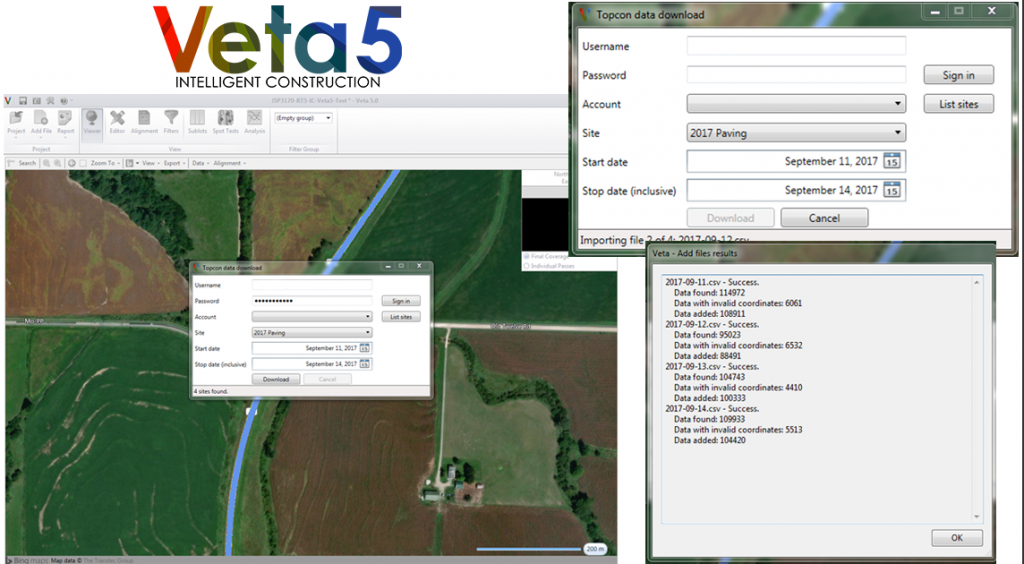
  • Better, faster, and more efficient data imports, including direct downloads from the cloud and a redesigned data import wizard to better handle data from various machines.
  • Redesigned and more powerful filters to handle any type of data extraction.
  • A filter group generator that can produce filter groups based on AASHTO PP81 naming conventions.
  • New features for more flexible data analysis options.
  • A new temperature segregation index (TSI) and new TSI analysis outputs.
  • Versatile PDF reports, including options to choose which items to report and the ability to add a logo and signature line.
  • Performance improvements to better handle huge project files.

View the 5.0 Release Notes to see all the new features and changes.

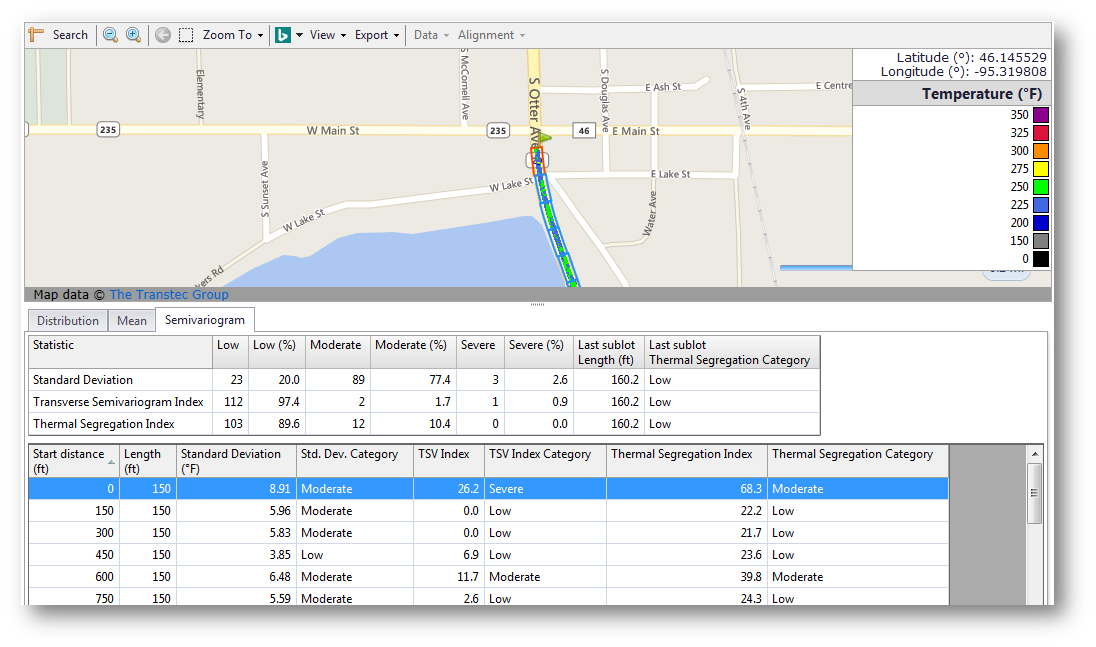
The new Temperature Segregation Index (TSI) is a composite index with conventional standard deviation and transverse semi-variogram.

The new Temperature Segregation Index (TSI) is a composite index with conventional standard deviation and transverse semi-variogram.

With greater control over construction data, users can perform more detailed analyses and create reports that can help agencies determine contractor pay factors. Construction teams implementing Veta 5 can expect to perform these complex tasks smoothly.

[button link=”www.intelligentconstruction.comveta/current-version/”]Download Veta 5 for Free[/button]

IC and PMTP systems gather a tremendous amount of complex geospatial data that poses challenges for data management, analysis, and reporting. These issues have become the main hurdles during implementation. To address the above issues, The Transtec Group, the Minnesota Department of Transportation, the Federal Highway Administration (FHWA), and the Transportation Pooled Fund Study, TPF-5(334) aided in the development of Veta.

Veta is required in FHWA and AASHTO PP80-17 and PP81-17 specifications and is increasingly adopted by state highway agencies.

Read more

Veta 4.3.28 Released

This version fixes an issue with the Transverse Semivariogram used in the thermal profiling analysis.

Download Veta 4.3

Analysis – Transverse Semivariogram

  • Change: The standard deviation uses a different algorithm and now matches the value in the distribution table.
  • Change: The default TSI specification has been changed. Moderate is now 30 and Severe is 70.
  • Fix: The wrong temperature data was used for each sublot.
Read more

Veta 4.3.27 Released

This version fixes a few problems. Most importantly, there was an issue where HAMM data was not always imported correctly. Existing HAMM projects will be reprocessed to correct this.

Download Veta 4.3

Import

  • Fix: HAMM data that was recorded as Vibratory but had no HMV value was marked as Vibratory instead of Static.

Filters

  • Fix: Adding more than one daily lot at a time could cause a crash.

Misc

  • Fix: Could not save extremely large projects.
Read more

Veta 4.3.23 Released

This version fixes an issue that caused data filters that used a range (minimum and maximum) to not have an effect. This will change any results that used such a filter. Final coverage will be automatically be reprocessed to correct this.

Download Veta 4.3

Final coverage will be reprocessed.

Filters

  • Fix: Selecting a range of values for an item in a data filter had no effect. For example:
    100 F < Temperature < 200 F

Analysis

  • Fix: Changes to the sublots could cause the software to crash when navigating the analysis.
Read more

Veta 4.3.21 Released

This version fixes several bugs affecting importing data files and filter usability. Release notes provided below.

Download Veta 4.3

Existing Volvo projects will be reprocessed.

Import

  • Fix: Some BOMAG files could be imported.
  • Fix: Files using UTM with feet or survey feet were not imported correctly. We will not force a reprocess for this because it the error could be seen on the map during import.
  • Fix: ICMV type was not detected for Volvo final coverage files.
  • Fix: ICMV type was not set to EDV for older Volvo all passes files.

Filters

  • Fix: Using filters could cause a crash.
  • Fix: Various issues with the ability to select filters. Same fixes that were applied to 4.2.37.

Analysis

  • Fix: Switching to the analysis after changing the selected sublots for the (Empty Group) could cause a crash.
Read more
Download Veta

Veta is a map-based tool for viewing and analyzing geospatial data. Download Veta for free.

Veta Intelligent Construction