Veta 6.0.147 Released

Veta Intelligent Construction

Numerous fixes. Of particular note, some projects will require reprocessing and the data length in thermal profiling coverage will likely be different if a project was not using meters.

Data Import

  • Fixed: Compaction mode was sometimes read incorrectly for TDS files. Existing projects with these files will be reprocessed when opened.

Map

  • Fixed: Rare crash when using the selection box to zoom to an area.
  • Fixed: Scale was always shown in meters or kilometers.
  • Fixed: Ruler distances were incorrect when using the coordinate system, “Other”.

Legends

  • Fixed: Removing all legend items caused a crash.

Filters

  • Fixed: Setting the source for a location filter to use an alignment file after changes had already been made to the filter could cause it to become corrupt. For existing projects, changing a value on the location filter back and forth may correct the filter. Such as changing an offset from 12 feet to 11 and back to 12. Otherwise, the operation filter will need to be recreated.
  • Fixed: Possible fix for crash when closing the filter group manager.
  • Fixed: Adding data from a new machine type to a project with existing operation filters did not set the defaults for some of the filters.
  • Change: If a project contains multiple machine types, applying the filter group will succeed if any of the machine types is successfully filtered. Previously, all machine types were required to be successfully filtered.

Analysis

  • Fixed: The data length for thermal profiling coverage was wrong when not using meters.
  • Change: If a project contains multiple machine types, the analysis will succeed if any of the machine types is successfully analyzed. Previously, all machine types were required to be successfully analyzed.

Legends

  • Fixed: Removing all legend items caused a crash.

Miscellaneous

  • Fixed: The progress window may never close after being minimized.
  • Fixed: The Project-Legends window had an incorrect title.
Download Veta 6.0

Read more

Veta 6.0.142 Released

Veta Intelligent Construction

Numerous fixes and some performance improvements. Analyzing multiple filter groups for compactors will now use less disk space.

Data Import

  • Fixed: Rare crash when canceling import.
  • Fixed: Reading invalid TDS files may cause a crash.

Filters

  • Fixed: EVIB was missing units.
  • Fixed: Override filter settings that are less restrictive than the settings in the respective filters did not work properly.
  • Fixed: Locations filters with a small number of points might cause a crash when applied.
  • Fixed: Clicking within some filter items caused the current filter group to be unapplied.

Legends

  • Fixed: EVIB and frequency units did not always match the project SI unit setting.
  • Fixed: Changes to a legend caused maps to draw progressively slower with each change.

Analysis

  • Fixed: While in the thermal profile, changing the legend did not immediately have an effect.
  • Fixed: Distance, length, and area values and units did not match the project’s location unit if meters was selected.
  • Fixed: When “Use currently selected filter group” was selected, changing the selected filter group or override filter did not clear analysis results.
  • Fixed: Using a location filter with no source set would still show percent coverage in sublots.
  • Change: Reduced disk usage when analyzing compactor data.

Download Veta 6.0

Read more

Veta 6.0.134 Released

Veta Intelligent Construction

Several fixes for analyses and one for opening TDS format files.

Data Import

  • Fixed: Some TDS files could be opened.

Analysis

  • Fixed: The map for sublots may show the same data for each operation filter.
  • Fixed: Sublot coverage area unit was sometimes shown incorrectly.
  • Fixed: Second and subsequent analyses would sometimes show the wrong values in the sublot coverage table.
  • Fixed: Compaction curve analysis may crash when analyzing small or irregular data sets. As a result of this fix, more passes may be now shown in the compaction curve.
  • Fixed: Temporary files created by analyses were not always deleted.

Download Veta 6.0

Read more

Veta 6.0.128 Released

Veta Intelligent Construction

Several fixes for filters. Please review the release notes below for more information. Also, due to some regressions in the previous version (that did not affect data), 6.0.127 will be removed from the web site in the near future.

Filters

  • Fixed: Selecting and checking all list items may not work when there are a large number of items (files, data lots, sensors, etc).
  • Fixed: Cold-edge filter may crash.
  • Fixed: Machine-specific exclusion filters were not cropped to Common location filter if the machine-specific location filter was not used.

Download Veta 6.0

Read more

Veta 6.0.127 Released

Veta Intelligent Construction

Many fixes. Please review the release notes below for more information.

Data Import

  • Fixed: MOBA-provided fix for downloaded files that have incorrect timestamps due to UTC month change.

Filters

  • Fixed: Offset location filters might be invalid but show as valid.

Legends

  • Fixed: Legends imported from a file or previous version of Veta could contain invalid values. Customizing these legends would cause the software to freeze if the values were not corrected.

Analysis

  • Fixed: Thermal profiler sublots that had no data would cause the sublot analysis to fail.
  • Fixed: Sublot coverage area was sometimes displayed in the wrong unit.

Reports

  • Fixed: Data lot report could be incorrect when checking if all thermal profiler sensors were selected. Likely caused by removing a data file that had more sensors than the other files.
  • Change: Data lot report now includes the name of the machine category to match the other reports.

Miscellaneous

  • Fixed: Various crashes.

Fixed: Some Veta 5 projects could not be opened.

Download Veta 6.0

Read more

Veta 6.0.121 Released

Many fixes. Please review the release notes below for more information.

Data Import

  • Fixed: Files using GDA94 or GDA2020 coordinate systems could not be imported.
  • Fixed: Some TDS files could not be imported.

Filters

  • Fixed: Fixed issue with cold-edge filter removing large quantities of data.
  • Fixed: Transverse semivariogram did not work when the source data was in Celsius.
  • Fixed: ICMV filtering did not work.
  • Fixed: The AASHTO naming template did not always show the correct route systems.

Analysis

  • Fixed: The Transverse semivariogram analysis was not correct for non-MOBA thermal profilers.
  • Fixed: After sorting the Transverse semivariogram table, selecting a row highlights the wrong sublot on the map. This is partially fixed and will be addressed in a later update.
  • Fixed: Thermal profile was cutoff when a large number of sensors were present.
  • Fixed: Overall speed analysis was ignoring the filtering settings.

Reports

  • Fixed: Excel report could sometimes not be created when there was an error with a sublot analysis.

Miscellaneous

  • Fixed: Various crashes.

Download Veta 6.0

Read more

Veta 6.0.112 Released

Many fixes. Thank you to everyone who allows automatic reporting of errors (in the Options). This leads a more stable product. Most of these issues were not reported by people and so would otherwise go unfixed.

Data Import

  • Fixed: Crash when using an invalid organization name for the Trimble downloader and improved input validation.
  • Fixed: Issue with adding PMTP files to an existing project with PMTP files.
  • Fixed: Added files from a new machine type to an existing project could cause a crash.

Data Files

  • Fixed: Screen did not update correctly when files were added.
  • Fixed: Removing multiple files caused a crash.

Filters

  • Fixed: The list of files did not update when files were removed from the project.
  • Fixed: Adding files from a new machine type did not update the filters list.
  • Fixed: Cold-edge filter did not apply for new projects.
  • Fixed: Right-clicking on the map could show options that were not allowed, leading to a crash.
  • Change: Exclusions should work much better. The exclusion will not be cropped to match the location filter unless both the location filter and exclusion each contain at least four points.

Analysis

  • Fixed: Deleting a filter group did not update the list of filter groups for analysis and could cause the analysis to fail.
  • Fixed: Deleting a filter group after an analysis could cause a crash.
  • Fixed: Compactor analysis failed if only Individual Passes was selected.
  • Fixed: Crash when selecting PMTP-related results when the analysis for those results failed.
  • Fixed: A sublot with a ‘bad’ outline would cause all of the sublot results to not be shown.

Reports

  • Fixed: Various issues that prevented the Excel report from being created.

Misc

  • Fixed: The software sometimes did not immediately show on the Windows taskbar.
  • Fixed: Opening a project that had a filter group applied would sometimes show as not applied.
  • Fixed: Crash when creating a new project.
  • Fixed: Viewing or editing project properties with a new or empty project could cause a crash.
  • Fixed: Double-click a toolbar button could cause a crash.

Download Veta 6.0

Read more

Veta 6 Released: Efficient, Comprehensive, and User-Friendly Intelligent Construction Data Analysis

Veta split screen map option

Veta, developed by The Transtec Group, is a free map-based intelligent construction data management software tool that enables contractors and highway agencies to analyze and report data collected from intelligent compaction (IC) rollers and paver‐mounted thermal profilers (PMTP)/infrared (IR) scanners or cameras.

Veta 6 is the latest software release and features a host of improvements, allowing a more comprehensive viewing and analysis for intelligent construction data. Veta 6 enhances usability and expands upon features included with previous versions.

Starting with Veta 6, IC and PMTP data can be imported into one Veta project file. This ability allows for more efficient data viewing, analysis, and reporting. Users will no longer need to switch back and forth between separate Veta files, producing a more streamlined experience.

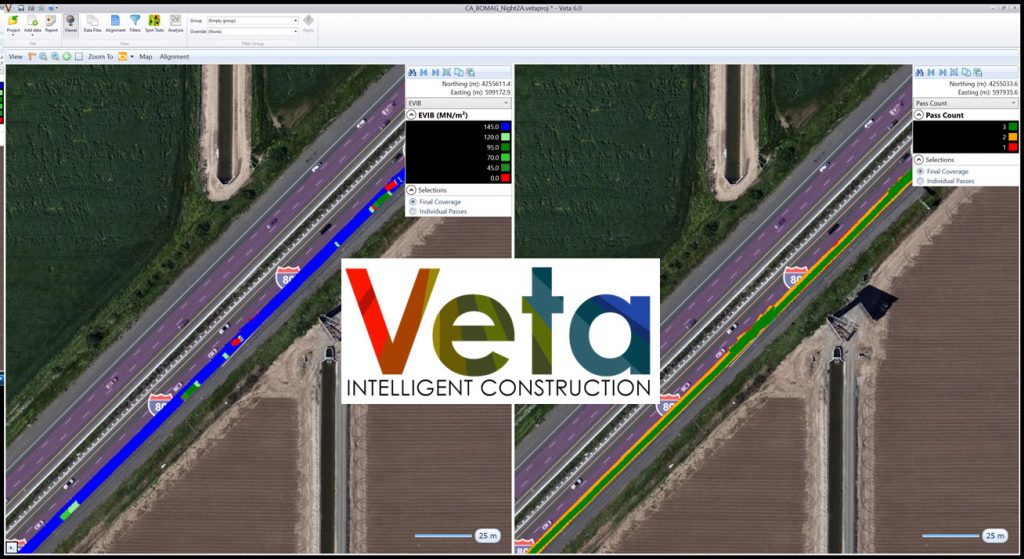
The new split screen map options allow users to view up to four types of data simultaneously, including combinations of IC and PMTP data. With this feature, users can easily spot relationships and trends between data sets. The intuitive interface dramatically increases efficiency by minimizing time spent hunting for correlating data among different files.

Veta 6 split screen map option

Veta 6 includes more direct download support from vendor cloud platforms such as MOBA, TOPCON, Trimble, and Wirtgen/Vögele. Users of these platforms can download data from the cloud directly into Veta 6 and get to work immediately. Users will no longer encounter data import compatibility issues. Direct download features also enhance data security to prevent data from being tampered with.

The Veta 6 updates also feature an improved legend management system, allowing users to customize and store any legend with project specific properties and easily import saved legends into future projects, saving time and resources. This innovation sets a precedent for all future legend systems implemented within geospatial information software.

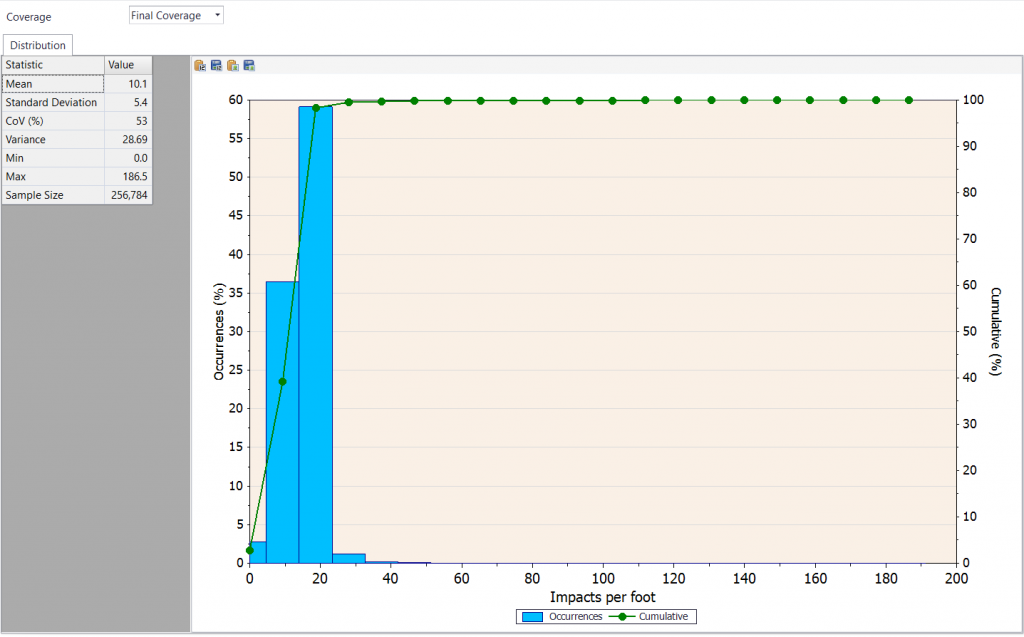
Reports now include “impacts per foot” as a new parameter. This metric is critical for ensuring optimum efforts for asphalt compaction.

Impacts per foot parameter for Veta reports

The spot test screen in Veta 6 now allows for cut-and-pasting of spot tests for any roller pass. A user can include spot test data from nuclear density gauges on specific roller passes and core data on the final lift in one file and cut-and-paste them into Veta all at once. The ability to utilize spot tests and specific passes will improve overall data analysis efficiency as well as shorten the time it takes to identify any discrepancies in data gathering.

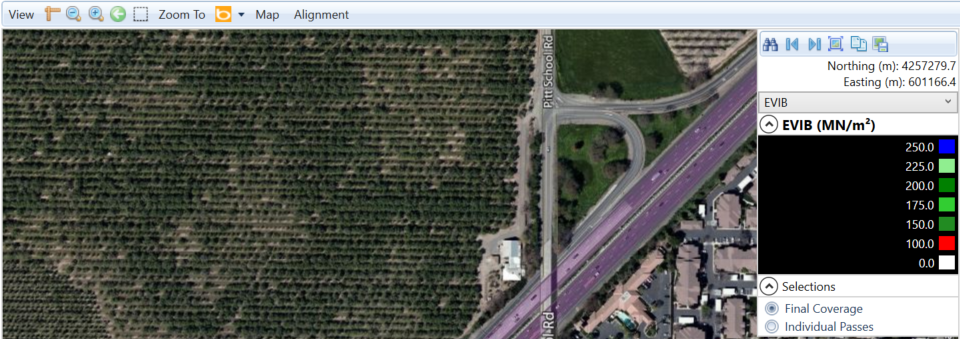
Finally, Veta 6 features high-quality map backgrounds coupled with superior zoom options. Flying blind is never fun! The new high-quality map feature and the new overview “mini-map” will improve the user’s overall experience with Veta 6.

High quality map in Veta

View the Veta 6.0 Release Notes to see all the new features.  

Veta is developed with funding and support from the FHWA, Minnesota Department of Transportation (MnDOT), Transtec, and The Transportation Pooled Fund (TPF) study, “TPF-5(334) Enhancement to the Intelligent Construction Data Management System (Veta) and Implementation”. Veta is required in FHWA and AASHTO PP80, PP81, and MP39 specifications and is increasingly adopted by state highway agencies around the world.

Read more

Veta 5.2.92 Released

Very important analysis fix for correlation and compaction curve.

Analysis

  • Fix: Compaction analysis of overall non-pass count correlation and sublot compaction curve sometimes produced incorrect results.

Reports

  • Fix: Transverse semivariogram was missing from the PDF report.
  • Fix: Removed extraneous information from differential table.
  • Fix: Thermal segregation QC chart was shown even if the semivariogram target was not used.

Download Veta 5.2

Read more

Veta 5.2.90 Released

This release contains numerous fixes.

Import

  • Fix: Map was showing the Search button, which is not applicable here.
  • Fix: TDS compaction files could not be imported if the footprint information was not stored with the ICMV.
  • Fix: Projects using TDS compaction files sometimes had the wrong frequency and/or temperature data due to an issue with measurement units. Existing projects will be reprocessed.
  • Change: TDS compaction files without icmv-compaction-mode can now be imported. The compaction mode will be set to Static for all data.
  • Change: TDS compaction files without footprint-parallel can now be imported. This item is not used for compaction data.

Filters

  • Fix: Crash when adding rows to the location filter grid.
  • Fix: Start and Stop coordinates for offset location filters were not always shown using the selected coordinate system.

Download Veta 5.2


Read more
Download Veta

Veta is a map-based tool for viewing and analyzing geospatial data. Download Veta for free.

Veta Intelligent Construction